Inventory Ageing: The Management Report Every Business Should Track
Inventory is often one of the largest assets on a company’s balance sheet.
For businesses that purchase, manufacture, distribute, or sell physical products, having accurate information about inventory is essential. But knowing the total quantity or total value of stock is only part of the picture.
Management also needs to understand how long that inventory has been sitting in the business.
This is where an inventory ageing report becomes extremely useful.
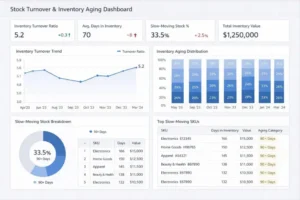
An inventory ageing report organizes stock according to how long it has remained in inventory or how long it has been since its last meaningful movement. It can help management identify inventory that is moving normally, slowing down, becoming excessive, or potentially becoming obsolete.
The report is not simply a warehouse document.
It can provide valuable information for finance, procurement, sales, operations, supply chain, and senior management.
What Is Inventory Ageing?
Inventory ageing refers to analyzing stock based on the length of time it has remained unused, unsold, or in inventory.
A typical ageing report may divide inventory into categories such as:
- 0–30 days
- 31–60 days
- 61–90 days
- 91–180 days
- 181–365 days
- 365+ days
The exact categories should depend on the company’s products and inventory cycle.
For example, 90 days may be normal for one industry but unusually long for another.
The purpose of ageing is to identify whether inventory is moving according to expectations.
Why Inventory Ageing Matters
A business may report:
Total Inventory: ₹10 Crore
That number alone does not tell management whether the inventory is healthy.
The same ₹10 Crore could consist of:
- ₹6 Crore of regularly moving inventory
- ₹2 Crore of slow-moving inventory
- ₹1 Crore of excess inventory
- ₹1 Crore of potentially obsolete stock
The total value is identical, but the business risk is very different.
Ageing provides this additional layer of visibility.
-
Inventory Ageing Helps Identify Slow-Moving Stock
Slow-moving inventory can quietly consume working capital.
Products may remain in storage because:
- Customer demand has declined
- Forecasts were inaccurate
- Too much was purchased
- Product preferences changed
- New products replaced older ones
- Sales efforts were unsuccessful
Without an ageing report, these products may continue appearing as normal inventory.
Regular ageing analysis makes them easier to identify.
-
It Helps Identify Dead Stock
Inventory that remains inactive for a very long period may eventually become dead stock.
Dead inventory can create several problems:
- Capital remains tied up
- Warehouse space is consumed
- Handling costs increase
- Product value may decline
- Disposal may become necessary
Ageing reports help management identify these items before the problem becomes larger.
-
Inventory Ageing Supports Working-Capital Management
Inventory represents money invested in stock.
When inventory moves quickly, that capital can potentially return to the business through sales.
When inventory remains inactive, the capital remains tied up.
This can affect the company’s ability to fund:
- Operations
- New purchases
- Expansion
- Marketing
- Technology
- Debt obligations
For finance teams, ageing is therefore an important part of working-capital analysis.
-
It Improves Purchasing Decisions
Procurement teams need to understand existing inventory before placing new orders.
Suppose a company has:
1,000 units currently in stock
and another:
1,000 units on purchase order.
If the existing inventory is already slow-moving, placing another large order may increase the problem.
An ageing report can provide procurement teams with information needed to question whether additional purchasing is necessary.
-
It Helps Evaluate Forecasting Accuracy
Inventory ageing can also reveal problems in demand forecasting.
If a large percentage of products repeatedly moves into older ageing categories, management should ask:
Was demand forecast correctly?
Other questions include:
- Were sales expectations too high?
- Was the product purchased too early?
- Was the minimum order quantity too large?
- Did customer demand change?
- Was the product lifecycle understood correctly?
This turns inventory ageing from a reporting exercise into a learning tool.
-
Ageing Can Highlight Product Lifecycle Risks
Some products have short commercial lifecycles.
Technology products, fashion products, electronic components, and certain consumer goods can lose value as new versions enter the market.
Ageing reports can highlight products that are approaching the point where they may become difficult to sell.
This allows businesses to consider appropriate action earlier.
-
Inventory Ageing Supports Sales Planning
Sales teams can also use ageing information.
If certain products have been in inventory for a long time, businesses may consider appropriate commercial strategies such as:
- Targeted promotions
- Customer-specific offers
- Bundling
- Alternate markets
- Sales campaigns
The objective should not simply be to discount everything.
Instead, the ageing report can help sales teams identify where additional demand-generation efforts may be useful.
-
Warehouse Space Is Another Hidden Cost
Inventory that remains in storage for a long time occupies physical space.
That space may otherwise be used for products that generate revenue more quickly.
Older inventory can also require:
- Handling
- Counting
- Labelling
- Storage
- Insurance
- Monitoring
Reducing unnecessary ageing can therefore improve warehouse utilization.
-
Not All Old Inventory Is Bad
This is an important point.
Ageing should not automatically be interpreted as a problem.
Some businesses naturally carry products with long inventory cycles.
Examples may include:
- Industrial spare parts
- Specialized components
- Emergency maintenance items
- Seasonal products
- High-value equipment
An item that has been in stock for 180 days may be perfectly normal in one business and a serious concern in another.
The ageing report should therefore be interpreted alongside the product’s normal demand pattern.
-
Combine Ageing With Inventory Value
Quantity alone can be misleading.
Consider two products:
Product A: 1,000 units × ₹10 = ₹10,000
Product B: 10 units × ₹50,000 = ₹5,00,000
Both may appear in an ageing report, but Product B represents a much larger financial exposure.
Businesses should therefore review ageing by:
- Quantity
- Inventory value
- SKU
- Category
- Location
- Supplier
- Product lifecycle
This creates a more meaningful management view.
-
Ageing by SKU Reveals Hidden Problems
Total ageing may look acceptable while certain SKUs have serious issues.
For example:
Category A: Mostly fresh inventory
Category B: High proportion of 180+ day stock
Category C: Large quantity of 365+ day inventory
Breaking the report down by SKU or product category allows management to focus attention where it is needed.
-
Inventory Ageing Can Improve Supplier Discussions
In some situations, ageing information can support supplier negotiations.
Depending on the commercial agreement, businesses may explore options such as:
- Stock returns
- Product exchanges
- Replacement
- Credit arrangements
- Alternate product allocation
These options depend on supplier terms and the nature of the product.
The ageing report provides evidence for the discussion.
-
Review Ageing Regularly
Inventory ageing should not be prepared only when management suspects a problem.
A regular review creates better visibility.
For example:
Monthly Review
Identify newly ageing products.
Quarterly Review
Analyze slow-moving and older stock.
Annual Review
Evaluate long-term purchasing and inventory policies.
The appropriate frequency depends on the business.
Fast-moving businesses may need more frequent monitoring.
-
Use Ageing to Improve Inventory Policies
If a company repeatedly sees the same products moving into older ageing categories, the issue may be structural.
Management may need to review:
- Reorder points
- Safety stock
- Minimum order quantities
- Purchase frequency
- Forecasting methods
- Supplier lead times
- Product assortment
This helps address the cause instead of repeatedly dealing with the symptom.
-
Inventory Ageing and ERP Systems
Modern ERP and inventory-management systems can make ageing analysis easier.
Useful information can include:
- Purchase date
- Receipt date
- Last movement date
- Last sale date
- Quantity
- Value
- Warehouse location
- SKU
- Batch number
However, the quality of the report depends on the quality of the underlying data.
If inventory transactions are incomplete or inaccurate, the ageing report may also be unreliable.
Practical Inventory Ageing Report Structure
A useful management report can include:
| Ageing Category | Quantity | Inventory Value | % of Total | Action |
| 0–30 Days | — | — | — | Normal monitoring |
| 31–90 Days | — | — | — | Review |
| 91–180 Days | — | — | — | Investigate |
| 181–365 Days | — | — | — | Action required |
| 365+ Days | — | — | — | Detailed review |
The exact ageing buckets can be customized according to the company’s inventory cycle.
Questions Management Should Ask
When reviewing an inventory ageing report, management can ask:
- Which products are ageing the most?
- What percentage of inventory is over 90 days old?
- How much inventory is over one year old?
- Which SKUs have the highest financial exposure?
- Why has this inventory not moved?
- Is the stock still saleable?
- Is there future demand?
- Can it be transferred to another location?
- Can it be returned to the supplier?
- Should purchasing be reduced?
- Is the product becoming obsolete?
- What process caused the inventory to accumulate?
These questions turn a simple report into a management tool.
Inventory Ageing Management Checklist
Businesses should regularly review:
-
Inventory age
-
Last movement date
-
Stock quantity
-
Stock value
-
SKU-level ageing
-
Slow-moving inventory
-
Dead stock
-
Product lifecycle
-
Demand forecast
-
Open purchase orders
-
Safety stock
-
Supplier lead times
-
Warehouse capacity
-
Potential recovery options